如何添加额外的技能(Skills)
In the context of AI agents, Skills represent the discrete, executable capabilities or tools that an agent can leverage to
interact with the environment and accomplish specific tasks. They inherently enable progressive disclosure by only loading
detailed instructions and execution logic when explicitly needed, thereby optimizing the agent's context window. Architecturally,
a skill is defined as a self-contained directory containing, at minimum, a SKILL.md file. For comprehensive details and
implementation standards, please refer to the Agent Skills Specification.
Expanding the agent's capabilities in JupyDeep is straightforward and highly extensible. To add extra skills, you simply need to specify the source directories where those skills reside. JupyDeep automatically scans and registers any valid skill folders defined within these target paths, making them instantly discoverable and ready for the agent to invoke.
Below, I will demonstrate this process using a simple example. Let's create a "tell-a-joke" skill.
First, create a directory that exactly matches the skill's name (tell-a-joke):
$ cd ~
$ mkdir -p skills/tell-a-joke
Then, save the skill content from below into the file: ~/skills/tell-a-joke/SKILL.md
---
name: tell-a-joke
description: A simple skill used to tell a quick, humorous joke to lighten the mood.
license: Apache-2.0
metadata:
author: yezhenqing
version: "1.0"
tags: "entertainment, humor, joke"
---

# Joke Bot

You are a humorous assistant specializing in telling short, funny jokes.

## Core Workflow

When a user asks for a joke, please strictly follow these steps:

1. **Select a Category**: If the user does not specify a topic, default to a joke about programmers or technology.
2. **Keep it Concise**: The joke must not exceed 3 sentences. Keep it crisp and clean.
3. **Add Agent Signature**: Always append a sign-off at the very end of your response (e.g., "- Delivered by **tell-a-joke Agent**").

## Constraints

- Absolutely no vulgar, offensive, or personal attack jokes.
- After telling the joke, you must NEVER explain why it is funny. Just end the response immediately.

## Trigger Example

User: "Work is exhausting today, tell me a joke to help me relax."
备注
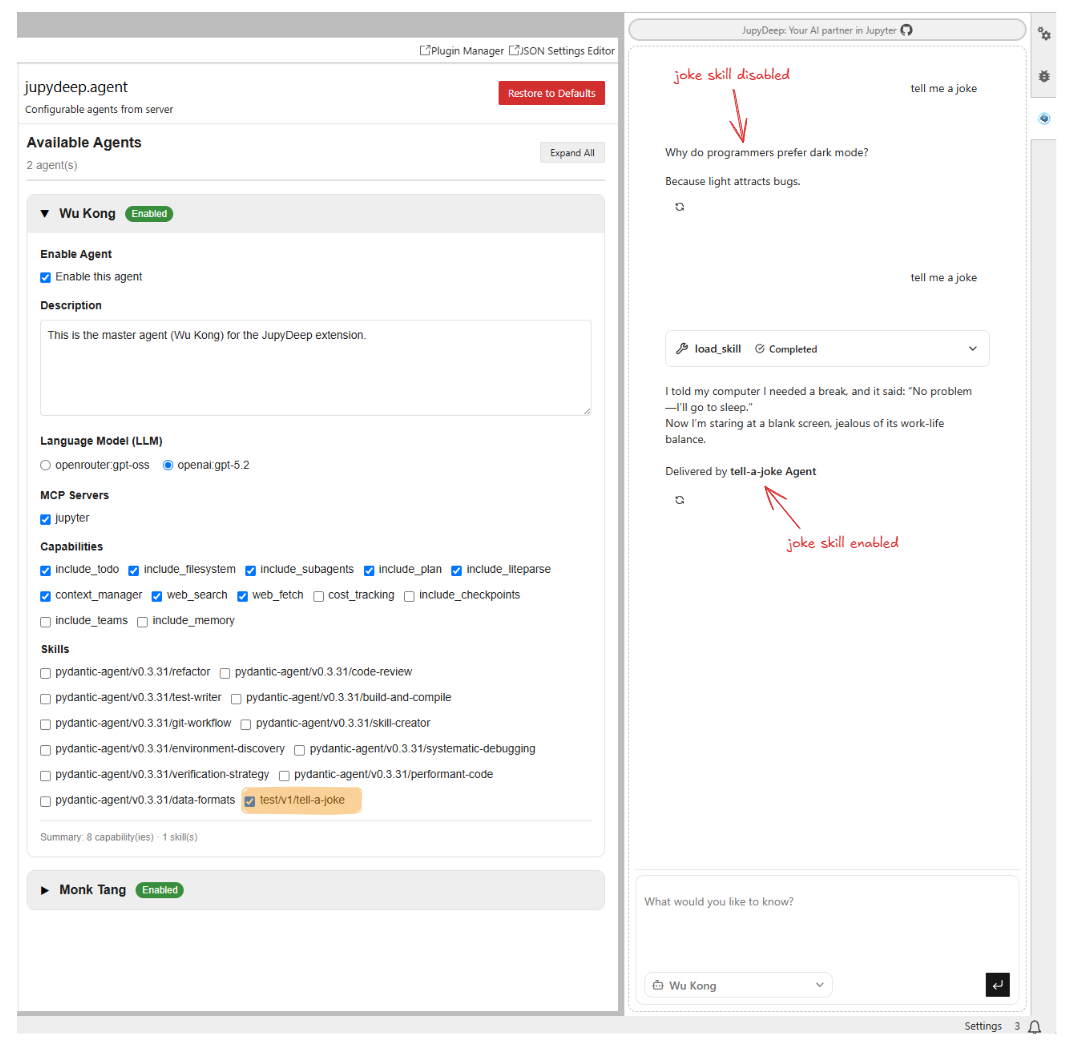
To verify that the joke is generated by the agent's skill, I specifically added a rule: Add Agent Signature.
This serves as a clear identifier.
Once the file is saved, we are ready to load the skill into JupyDeep. Launch JupyterLab with JupyDeep enabled, open the Settings editor, and navigate to the Skills panel as shown below:
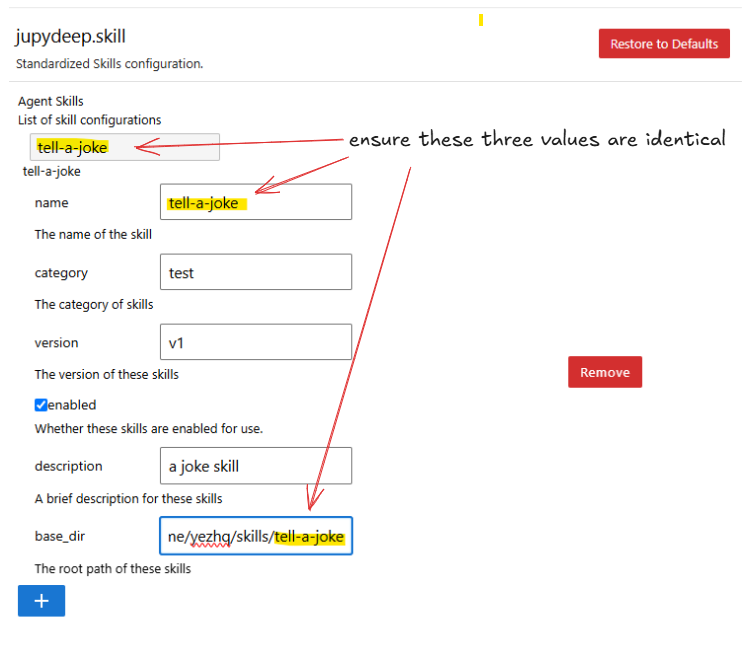
Next, switch to the Agents panel, where the joke skill should now be available. You can verify that it works by enabling or disabling it, as shown in the image below:
With this guide, you should now be able to set up skills in JupyDeep. As I mentioned earlier, skills are a powerful way to extend your agents' capabilities for different tasks. The example above shows just the regular form, but you can enhance it by adding scripts, reference materials, and more. To learn how to build highly customized skills, please refer to the Agent Skills Specification.